Stop burning AI usage
on context you
already built.
Export Claude chats. Create clean handoffs. Continue work in a fresh AI thread.
- Beta cohort onboarding flow
- Pricing page A/B test — live
- Schedule design review
- Confirm launch date with marketing
Every fresh thread
starts cold.
Your old Claude chats already contain the project goals, decisions, open loops, and working memory. Without a handoff, you spend scarce AI usage rebuilding it.
Claude strands you
mid-thought.
The thread is too full, but starting over means rebuilding context from scratch.
The file you need
will not attach.
Screenshots, docs, and project state get trapped outside the thread that needs them.
Every recap
burns usage.
A new AI cannot see the decisions, pivots, and working memory you already built.
Claude taps out.
Your next AI picks up.
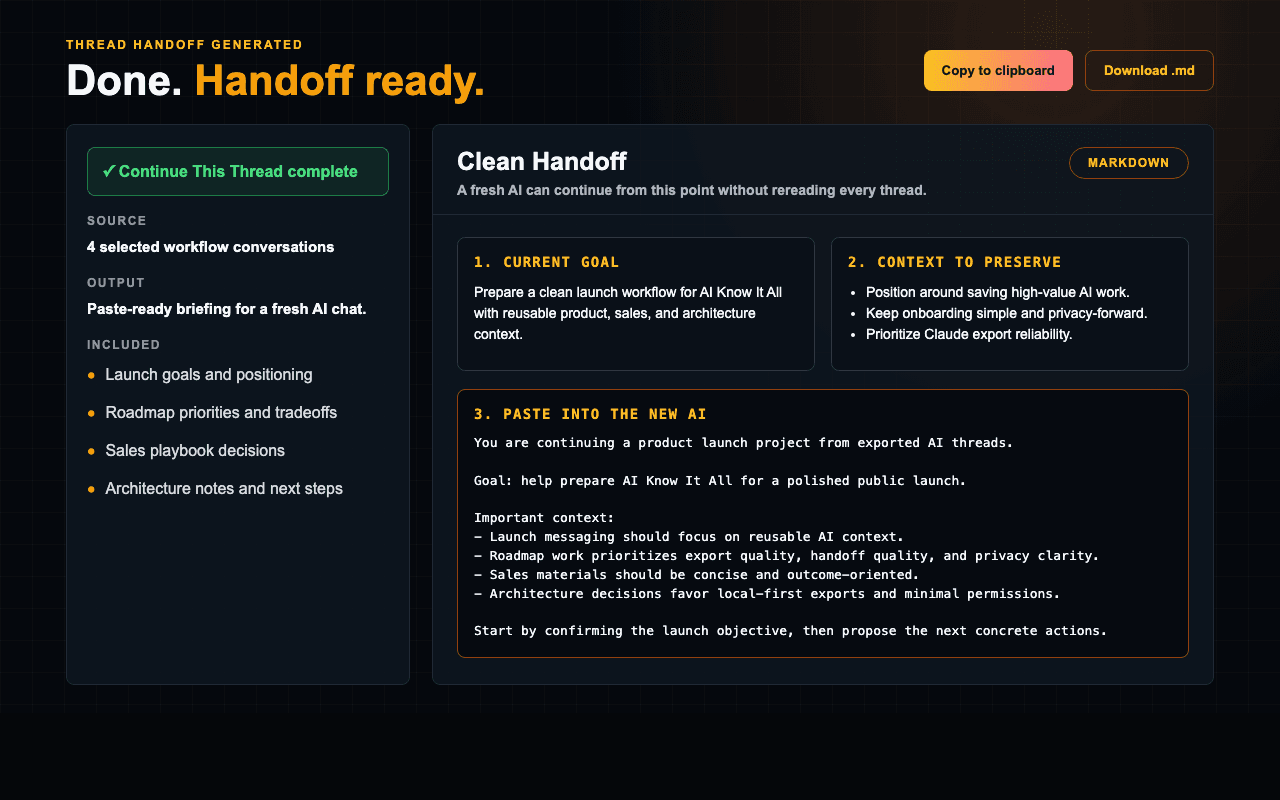
When the thread gets too full, uploads fail, or every recap burns usage, AI Know It All turns the overloaded conversation into a handoff a fresh AI can use immediately.
You are stuck explaining instead of building.
- Thread too fullThe useful work is buried in a conversation that cannot keep going cleanly.
- Upload rejectedThe screenshot, doc, or file that would clarify everything will not attach.
- Usage running outEvery manual recap spends scarce AI usage on context you already built.
- Too many pivotsOld names, rejected paths, and new decisions collide in the same thread.
The work is still there. The thread just cannot carry it anymore.
"I know where we left off."
A fresh AI starts with the parts that matter, not another cold recap.
Six ways to reuse what your AI already knows.
Turn long chats into handoffs, project memory, open loops, briefs, and reusable workflows.
- Preserve the goal, decisions, and next steps
- Move into a fresh AI chat without starting over
- Best for 1–5 related project threads
- Bring your projects, preferences, and decisions forward
- Give a new AI your operating context from day one
- Best for serious builders with lots of AI history
- Recover useful ideas from old conversations
- Find decisions, insights, and patterns you forgot
- Stop re-solving the same problems
- Surface paused projects and dangling commitments
- Turn forgotten threads into clear next steps
- Great for founders juggling too much
- Rebuild the current goal, status, and decisions
- See risks, blockers, and next actions
- Get back into motion quickly
- Turn repeated thinking into reusable systems
- Capture your best workflows before they disappear
- Build operating playbooks from real conversations
From Chrome extension to handoff.
Sixty seconds.
The Chrome extension handles the Claude.ai export flow. ChatGPT support is coming soon.
Install the extension. Pick your move.
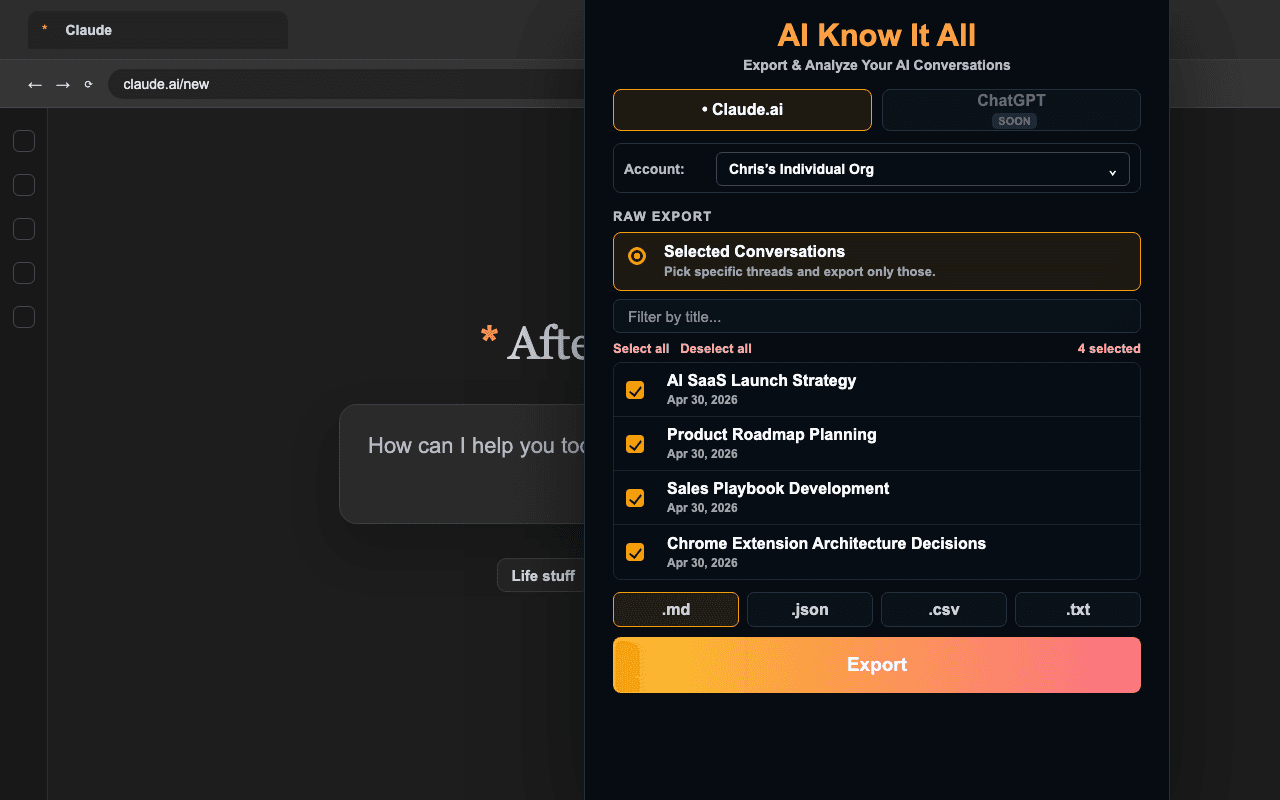
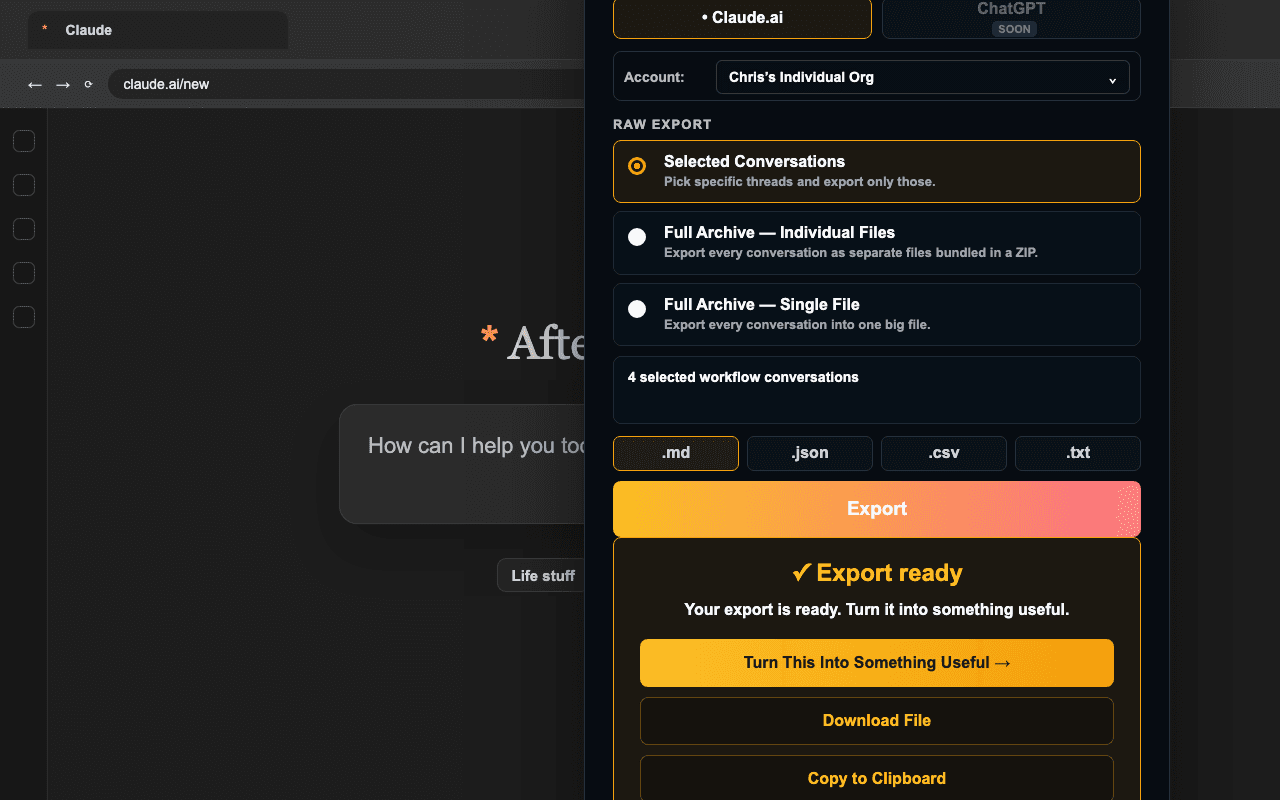
Open the extension on Claude.ai, choose the conversations that matter, then export or generate a handoff. ChatGPT support is coming soon.
No copy-paste. No JSON wrangling. No "let me figure out how to export my data" rabbit holes.
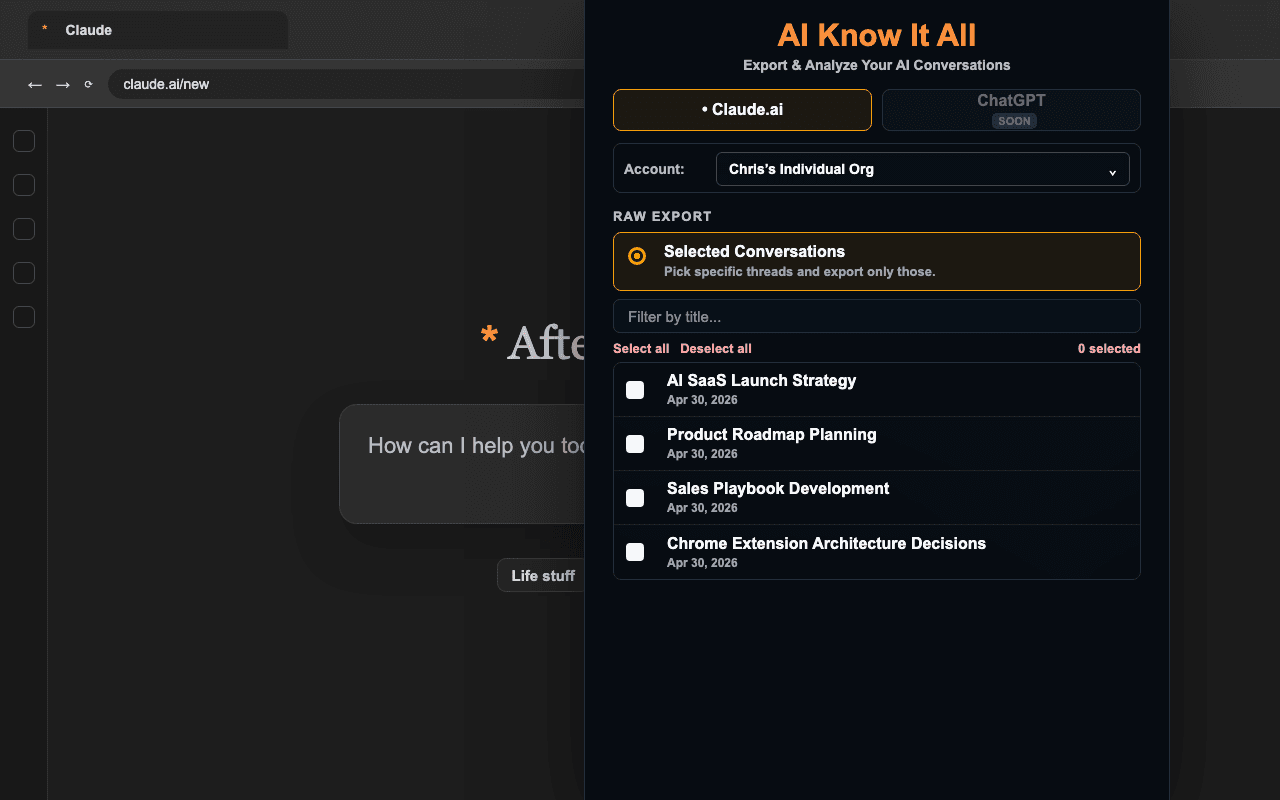
Choose. Export. Continue.
Pick the chats that matter, get a clean raw export, or generate a handoff for a fresh AI thread.
The extension keeps the workflow compact: select conversations, create the output, then decide whether to download or keep going in the web app.
Two files. Ready for a fresh AI thread.
Get back a clean ai_context.md and a CLAUDE.md companion for Claude Code projects. Built for Claude today, and portable to the next AI thread you use.
Switching models, restarting a project, or coming back after weeks away? Your context comes with you.
The Train a New AI briefing that helps prevent context loss.
One portable context package. Drop it into a brand new Claude window today, or adapt it for the next AI thread you want to continue.
Ships with a CLAUDE.md companion ready to drop into any Claude Code project.
- Paste once. Give a new AI the context it needs faster.
- Regenerates as your history grows — no manual updates.
- Human-readable. You own it. Yours to edit, fork, share.
Sarah Chen — indie product builder in Brooklyn. Currently shipping two SaaS tools (a habit tracker for ADHD founders + a Notion-to-Linear sync) while consulting on developer experience for early-stage startups.
- FocusFlow: ADHD-friendly habit tracker. 1,200 paid users. Working on streak recovery feature this sprint.
- Notion-Linear Sync: Closed beta with 30 teams. Pricing decision pending — leaning toward $15/seat.
- Direct and casual — skip corporate hedging, get to the point
- Code blocks for anything copy-pasteable, full file paths always
- Push back when I'm wrong — don't just agree to be agreeable
- Surface trade-offs upfront before recommending a path
- Stack default: Next.js + Supabase + Vercel for everything
- FocusFlow uses RevenueCat for subscriptions — committed long-term
- No email marketing platforms — using Resend + custom flows
- 10-manual rule: validate any workflow by hand 10 times before automating
- Phased rollouts only — read-only → dry-run → live
- Diagnosed pattern: I scope-creep when bored. Discipline checkpoints every Friday.
Start free.
Go Pro when ready.
Start free. Upgrade when you realize you never want to paste context manually again.
- Raw exports included
- 3 web app starter outputs
- 1 extension Continue This Thread trial
- Up to 50 conversations
- Claude export files supported
- Train a New AI requires Pro
- Unlimited outputs
- Unlimited handoffs
- Full history — no cap
- All 6 modes, always
- Train a New AI
- CLAUDE.md companion export
- Priority extension updates
- Shared context workspaces planned
- Team handoff libraries planned
- No team checkout today
- Use Pro for current launch access
Plain language. No legalese.
You're trusting us with your AI conversation history — the least we can do is be specific about what happens to it.
Where it lives
Raw extension exports are generated locally and downloaded by you. Account backup is off by default; if you enable or run backup while signed in, backup copies may upload to your account. If you choose AI handoff or context generation, selected content is processed by AI Know It All to create the output.
Third parties
AI generation currently uses Anthropic's API. Stripe handles billing for Pro. ChatGPT support is coming soon.
Training
Your data is never used to train AI models. Not by us, not by Anthropic — per their API terms.
What we keep
Generated outputs can be saved to your account so you can find them again. Delete saved items from your history page.
Auto-backup (opt-in)
Backups are off by default. If backup is enabled or run while signed in, backup copies may upload to your account. Keep it off if you only want local downloads.
Deletion
Email crosehi@gmail.com and we'll wipe your account within 7 days. Self-serve deletion is on the roadmap.
Next time Claude taps out, keep going.
3 web app starter outputs included. No credit card. Go from exported Claude threads to a usable handoff in minutes.
Try free — no credit card